
IP conflicts
Incorrect manual assignment can lead to duplicate IP addresses and trigger a network outage.
⇒ Before every manual IP assignment, verify that the address is actually free (App/App/IP plan).
Also document temporarily assigned QuickAdd addresses (in your own documentation, since QuickAdd addresses are only used production-wide and not company-wide).DHCP Overlap
Pools from different access points overlap accidentally.
⇒ Only integrate DHCP servers documented in the IP plan into the system. Verify pool settings. Only integrate external routers (e.g. from third-party technicians) into the system after qualified review.
Reset Trap
Device reverts to factory IP settings after factory reset.
⇒ Check the device’s network settings after a factory reset and compare them with the IP plan.
DANTE Controller finds devices but they cannot be configured
MAC-Problem + Parallels
⇒ macOS Dante Controller finds the devices but nothing can be configured (sometimes it works – but I haven’t been able to narrow down the error)
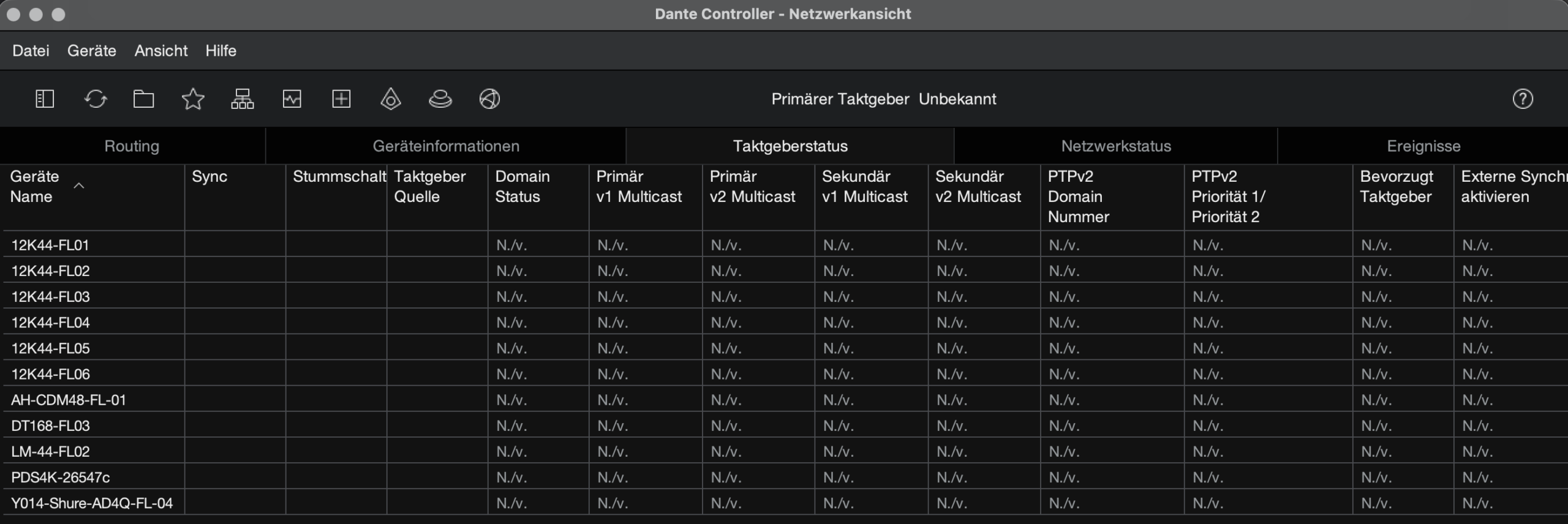
what runs reliably:
via Parallels (also Windows Dante Controller) but with a dedicated router, because the CDM router (via network port) does not allow bridged mode and the virtual machine then gets an auto-IP address (169.254.x.x)
with a dedicated router, bridged mode works
Bridged mode means that Windows then appears as a standalone machine on the network

Troubleshooting | Risks in Live Operation
Letzte Aktualisierung: 10. June 2026

Network- & RF-Info

Powered by

© 2026 SWu Labs · Steffen Wutzke